
Posted by Automation Distribution Industrial Robotics & Motion Control Staff on Mar 23rd 2026
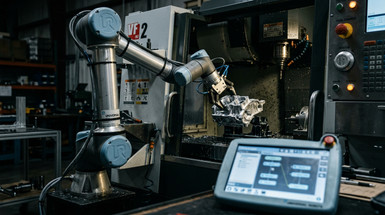
PolyScope X: Universal Robots Raises the Bar for CNC Machine Tending Automation
If you've spent any time integrating cobots into high-mix, low-volume machining environments, you know the friction points well: lengthy changeover routines, rigid program structures that resist modification, and software toolchains that weren't designed with the machine shop floor in mind. Universal Robots' PolyScope X addresses each of these head-on - and after two years of continuous development since its 2023 debut, it has matured into a genuinely differentiated platform that reshapes what cobot software in a machine tending context should actually be capable of.
Originally unveiled at Automatica 2023 in Munich, PolyScope X is not a UI refresh on top of the legacy PolyScope 5 architecture. It is a ground-up software rearchitecture running on the new CB5.6 control box hardware platform - now globally available and shipping as standard on new UR deployments, with upgrade kits available for existing e-Series and UR20/UR30 installations. As of early 2026, the platform is at version 10.12, with several major capability milestones added throughout 2024 and 2025 that substantially extend what was announced at launch.
The Core Problem PolyScope X Solves
Traditional cobot software - including PolyScope 5, which remains supported under a Long Term Support path through at least 2027 - was designed as a general-purpose programming environment. That generality is useful, but it carries a cost: every time a job changes, a machine configuration shifts, or a new part family enters the cell, someone with programming knowledge has to intervene. In high-mix environments running dozens of part numbers across CNC mills, lathes, and machining centers, this creates a hard ceiling on how flexible your automation can actually be.
PolyScope X attacks that ceiling directly. Universal Robots' benchmark is unambiguous: changeover times of under 10 minutes - a figure they state is not achievable with any other currently available software platform. For production managers and process engineers running 2- or 3-shift operations with frequent job rotations, that number has direct throughput implications. More changeovers per shift means more batches per day. More batches per day means the economics of automating low-volume work actually pencil out.
Key Technical Features for Machine Tending Applications
CB5.6 Hardware Platform and Migration Path
PolyScope X runs exclusively on the CB5.6 control box - UR's latest controller generation. This is an important detail for fleet planning: the CB5.6 is now the unified hardware platform across PolyScope X and PolyScope 5.26 LTS, meaning customers can standardize hardware purchases on CB5.6 today and choose their software migration timeline independently. A fleet running PolyScope 5.26 LTS on CB5.6 hardware can transition to PolyScope X on a cell-by-cell basis without a hardware swap. For OEMs and integrators building scalable machine tending solutions, this removes a significant barrier to upgrading existing installations.
Motion Profiles: Named Speed/Acceleration Presets Across the Entire Program
One of the most practically significant additions in the 2025 release cycle (SW 10.10.0) is Motion Profiles - named speed and acceleration configurations that can be defined once and referenced throughout an entire program, regardless of whether moves share a folder or branch in the program tree.
For machine tending specifically, this means you can define profiles like 'Approach', 'Inside_CNC', 'Retract', and 'Transit' with application-appropriate dynamics, then apply those profiles to every relevant move node in a single operation. When cycle time needs to be optimized or safety envelopes change - say, a new workpiece changes the required deceleration profile inside a machine - you update one profile definition rather than hunting through every move node in the program. Three profile types cover Joint, Linear, and Process move types, and the new OptiMove speed-setting mode expresses values as a percentage of maximum allowed rather than absolute m/s, which improves program portability across cobot models and reduces the risk of inadvertently pushing beyond safe operating limits.
Teach Mode for Full-Path Recording
Introduced in SW 10.8.0 (April 2025), Teach Mode allows operators to physically guide the robot through an entire motion sequence - loading approach, in-machine positioning, workpiece handoff, door clearance - with every Smart Skill action triggered during the recording automatically inserted as a node in the Program Tree. The result is a complete, editable program generated from a single physical demonstration, with no manual node construction required. For machine tending applications where approach paths are geometrically complex or highly fixture-specific, this dramatically reduces the time between physical cell commissioning and a running program. Each inserted node is independently reconfigurable after recording, so the output is not a black-box playback but a structured, maintainable program.
Operator Screen and Progressive Disclosure UI
The dedicated Operator Screen separates the operator-facing changeover interface from the underlying program logic. Floor operators can swap part programs, adjust parameters, and confirm fixture configurations without touching the underlying robot program or requiring programmer support. This matters in machine shops where the person running the cell is rarely the person who programmed it. Progressive disclosure surfaces only the controls relevant to the current task - reducing cognitive load and eliminating the error surface that comes with exposing unnecessary parameters to production operators.
In SW 10.10.0, Operator Screen Configuration was moved to its own dedicated application screen, making it easier to customize which controls are exposed to operators on a per-application basis.
Remote Mode for Secure External Connectivity
SW 10.10.0 also introduced Remote Mode - a security-hardened external connectivity state that can be toggled directly from the Safety Overview dialog. When active, Remote Mode locks the PolyScope X interface into a read-only state: all editing and robot control is disabled, the Primary Interface is accessible to external devices (PLCs, SCADA, MES), and only the Operator Screen remains visible in view-only mode. A Remote Mode indicator is displayed above the safety checksum so floor personnel can immediately identify the system's state.
For integrators connecting UR cobots to CNC machine controllers, shop floor SCADA systems, or MES platforms via MQTT, OPC-UA, or MODBUS TCP, Remote Mode provides a clearly defined, auditable boundary between operator interaction and external system control - a requirement in many regulated production environments.
Manual High Speed (3PE Device Support)
SW 10.10.0 added a Manual High Speed slider accessible from the teach pendant footer when operating with a Three-Position Enabling (3PE) device. Previously, manual mode was capped at 250 mm/s regardless of 3PE use. The slider allows temporary speed limits above 250 mm/s to be set during teaching, with an automatic reset to 250 mm/s after 5 minutes of 3PE inactivity. For large-reach applications like UR20-based VMC tending where approach paths span significant linear distances, the ability to teach at higher speeds substantially reduces the time spent in manual programming sessions.
Node-Based Modular Programming and Reusable Functions
PolyScope X's programming architecture is built around modular nodes and deeply nestable reusable functions. Integrators and OEM partners can structure program logic into discrete, named operations - chuck open/close sequences, door interlock handshakes, part inspection routines - and call those operations throughout the program as needed. Functions support arbitrary nesting depth, which compresses the visible program tree and makes complex routines far more readable and maintainable. Multi-node copy/paste via a unified clipboard accelerates the process of building and adapting programs across job variants.
World-Centric Frames and Reduced Waypoint Re-Teaching
PolyScope X introduces world-centric coordinate frames that allow waypoints to be defined relative to the environment rather than hardcoded in robot joint space. Combined with relative transformations between frames, this means repositioning a fixture or swapping to a new machine variant doesn't require rebuilding motion paths from scratch. For OEMs maintaining a standardized tending cell across multiple customer machine types, this alone can eliminate hours of re-teaching per installation.
Offline Programming via Browser
PolyScope X's technology stack allows it to run from any device with a standard web browser, enabling full offline robot programming without access to the teach pendant or controller. Programs are exported and imported as a single consolidated file containing all application and program data - straightforward version control and deployment across multiple robots without fragmented config files.
Dedicated Safety Configuration Toolbox
Machine tending automation operates in a complex safety envelope: tool changers, machine doors, spindle interlocks, operator access zones, and varying part geometries all impose constraints that must be configurable per application. PolyScope X includes a dedicated safety toolbox - architecturally separated from the motion program - allowing safety parameters to be configured, locked, and audited independently. The 10.10.0 release also simplified the Safety application screen navigation, reducing scrolling and restructuring I/O sections for clearer input/output separation.
The AI Acceleration Layer
PolyScope X's architecture is explicitly designed as a foundation for AI-powered capabilities. At IMTS 2024, Universal Robots demonstrated a machine tending application built on PolyScope X integrating AI-based perception running on an NVIDIA Jetson AGX Orin system-on-module, using NVIDIA Isaac accelerated libraries and the Isaac Manipulator stack. This enables dynamic collision-free path planning in and out of machine envelopes without requiring manual path configuration for each part variant - directly addressing one of the hardest problems in flexible machine tending.
The UR AI Accelerator toolkit, also built on PolyScope X, adds an Orbbec Gemini 335Lg 3D camera to deliver out-of-the-box support for pose estimation, object detection, tracking, image classification, quality inspection, and state detection. For integrators building inspection-integrated tending cells, this is a production-ready hardware/software stack. The architecture is open: developers can choose their own toolsets, programming languages, and libraries within the PolyScope X environment, building proprietary IP on top of the platform rather than being constrained to a closed ecosystem.
Compatibility and Ecosystem
PolyScope X runs on CB5.6 hardware across the full UR e-Series and UR-Series cobot lineup, including the UR20 and UR30 - UR's longer-reach, higher-payload platforms suited to tending larger VMCs and HMCs. Upgrade kits are available for all current UR models. The UR+ ecosystem now comprises over 500 certified products from more than 334 partner companies. Smart Skills - purpose-built application modules contributed by UR+ developers - are accessible from anywhere within PolyScope X through a unified drawer, meaning validated partner solutions for grippers, vision systems, force/torque sensors, and conveyors integrate into the programming environment without custom integration work.
PolyScope X vs. Competing Platforms
vs. FANUC CRX / iHMI: FANUC's collaborative platform delivers strong motion performance and native CNC-to-CNC communication, but its programming conventions carry a steep learning curve for non-roboticists. PolyScope X's operator screen, Teach Mode, and progressive disclosure model set a substantially lower threshold for day-to-day changeover operations by non-programmers.
vs. KUKA iiQKA: KUKA's modern iiQKA environment is cloud-connected but remains in limited deployment. PolyScope X has a mature, field-validated ecosystem with a large installed base and a far deeper library of validated third-party peripherals.
vs. ABB GoFa / Wizard Easy Programming: ABB's Wizard simplifies basic tasks but lacks the Motion Profiles system, Teach Mode, world-centric frame architecture, and Remote Mode secure connectivity that PolyScope X now offers for managing complex, multi-variant machine tending programs at scale.
vs. Techman / Doosan: These platforms offer competitive graphical environments but significantly smaller partner ecosystems and no equivalent to PolyScope X's AI Accelerator stack or CB5.6 hardware platform roadmap.
The honest summary: PolyScope X leads the collaborative robot market specifically in the combination of fast changeover, modular program architecture, named motion profiles, operator-accessible interfaces, secure external connectivity, and AI-ready extensibility for machine tending applications.
ROI Context
Universal Robots cites an average return on investment of six months across its cobot installed base. In machine tending specifically - where the cobot replaces a labor cost that compounds across every shift - the sub-10-minute changeover capability means the system remains productive across more job types than previous-generation automation could economically justify. Teach Mode, Motion Profiles, and offline programming collectively reduce billable integration hours per deployment, which directly improves total cost of ownership for OEM and integrator customers.
The CB5.6/PolyScope 5.26 LTS migration path also means organizations with existing PolyScope 5 fleets are not forced into a wholesale hardware refresh to begin adopting PolyScope X on new cells - a meaningful capital planning advantage in environments where robot fleet standardization is a procurement priority.
Bottom Line
As of 2025–2026, PolyScope X is the most mature, purpose-built machine tending software platform in the collaborative robot market. Its modular programming architecture, Motion Profiles, world-centric coordinate system, Teach Mode, dedicated operator interface, Remote Mode secure connectivity, integrated safety toolbox, and AI-ready hardware stack address the specific technical and operational constraints of high-mix CNC automation in a way that general-purpose cobot software - including PolyScope 5 - cannot.
For engineers specifying cobot cells for CNC machine tending, and for integrators building scalable, repeatable turnkey solutions, PolyScope X represents not just a current-generation capability improvement, but a platform with a clear and active development roadmap - one that is visibly closing the gap between flexible cobot automation and the full-autonomy potential of AI-driven machine tending.
Automation Distribution is a stocking distributor of Universal Robots cobots and accessories. Contact our applications team to discuss PolyScope X compatibility with your current or planned cobot fleet.
Frequently Asked Questions: Universal Robots PolyScope X
What is Universal Robots PolyScope X? PolyScope X is Universal Robots' next-generation cobot operating system and programming platform, introduced in 2025 as the successor to PolyScope 5. It was purpose-built for machine tending automation, with a redesigned user interface, modular node-based programming architecture, and native support for AI-powered capabilities. It runs on the CB5.6 control box and is compatible with all UR e-Series, UR20, and UR30 cobot arms.
What controller hardware does PolyScope X require? PolyScope X requires the CB5.6 control box. This is UR's current-generation controller and is now the standard hardware platform for all new UR cobot shipments. Customers with existing e-Series, UR20, or UR30 cobots can purchase a PolyScope X Upgrade Kit to migrate their hardware. PolyScope 5.26 LTS also supports CB5.6, so customers can standardize on CB5.6 hardware now and choose their software migration timing independently.
How fast is PolyScope X changeover time for machine tending? Universal Robots states that PolyScope X enables cobot machine tending changeover times of under 10 minutes - a benchmark they describe as faster than any other currently available robot software platform. This is achieved through the Operator Screen (which allows non-programmers to execute changeovers independently), world-centric programming frames that reduce waypoint re-teaching, and reusable modular program functions that eliminate repetitive reprogramming across job variants.
What is the difference between PolyScope X and PolyScope 5? PolyScope 5 is UR's previous-generation software platform, still actively supported under a Long Term Support path through the end of 2027. PolyScope X is a ground-up rearchitecture designed specifically for high-mix, low-volume automation. Key differences include: CB5.6 hardware requirement, a browser-accessible offline programming environment, Motion Profiles for shared speed/acceleration parameters, Teach Mode for full-path recording, a dedicated Operator Screen for changeover without programmer involvement, Remote Mode for secure PLC/SCADA integration, and a native AI Accelerator stack powered by NVIDIA Jetson AGX Orin and Isaac libraries.
What is PolyScope X Teach Mode? Teach Mode, introduced in SW 10.8.0, allows operators to physically guide the robot through a complete motion path - including any Smart Skill interactions - and have that path automatically converted into a structured, editable program. Every Smart Skill action triggered during the recording is inserted as its own node in the Program Tree, making the resulting program fully reconfigurable rather than a fixed playback sequence. For machine tending applications, Teach Mode dramatically reduces cell commissioning time for geometrically complex loading and unloading paths.
What are PolyScope X Motion Profiles? Motion Profiles are named speed and acceleration presets - for example, Inside_CNC, Approach, or Transit - that can be defined once and applied to any move node throughout a program, regardless of program structure. Introduced in SW 10.10.0, Motion Profiles use the OptiMove system to express speed as a percentage of maximum allowed, improving portability across cobot models and reducing the risk of misconfigured dynamics. When a speed parameter needs to change - due to a new workpiece, a revised safety assessment, or a cycle time optimization - only the profile definition needs updating, not every individual move node.
Is PolyScope X compatible with CNC machine controllers like Fanuc, Siemens, and Hurco? Yes. PolyScope X communicates with CNC machine controllers via standard industrial interfaces including digital I/O, MODBUS TCP, PROFINET, and OPC-UA, depending on the CNC platform. Remote Mode in PolyScope X provides a secure, read-only interface state that allows external systems - including CNC controllers and SCADA/MES platforms - to connect via the Primary Interface while preventing unauthorized program changes. Validated integrations with Hurco VMC and HMC machines, including collaborative auto-door and pneumatic vise configurations, are available through UR's certified partner ecosystem.
Does PolyScope X support AI-powered machine tending? Yes. The UR AI Accelerator - built on PolyScope X and powered by an NVIDIA Jetson AGX Orin system-on-module and NVIDIA Isaac accelerated libraries - enables AI-driven capabilities including dynamic collision-free path planning, pose estimation, object detection, part tracking, image classification, quality inspection, and state detection. The toolkit includes an Orbbec Gemini 335Lg 3D camera and is designed as a production-ready, go-to-market architecture for integrators developing AI-powered tending applications. The platform is open, allowing developers to bring their own toolsets, programming languages, and libraries.