
Photoneo VC-SWDL-DELAY LayerPick Module, AI Delayering Software for Whole-Layer Robotic Pallet Unloading
PhotoneoPhotoneo LayerPick Module (Delayering), VC-SWDL-DELAY
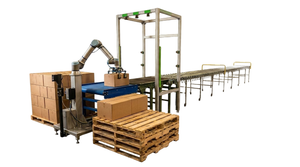
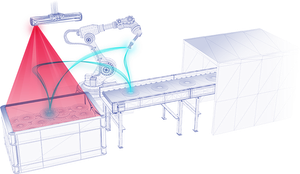
Photoneo's AI delayering module for robotic pallet unloading one full layer at a time. It localizes the top layer of a pallet with Photoneo 3D vision and a neural network so the robot can lift the whole layer in a single action, keeping the goods within that layer intact.
Many pallets arrive as uniform layers, each holding a set quantity of the same product. Picking those goods one item at a time wastes most of the cycle. LayerPick targets that case. Photoneo states it can grab the top layer regardless of the goods or pallet size, and handles boxes, bottles, cans, and paper rolls, whether stand-alone or wrapped in plastic.
This is a module, not a standalone product
LayerPick is a software extension to Photoneo's robot intelligence platform. To deploy it you also need Locator Studio and a Photoneo 3D sensor. Ordering the module alone will not produce a working cell. Contact Automation Distribution and we will confirm the full configuration before you order.
Published capabilities
| Parameter | Photoneo published information |
|---|---|
| Part number | VC-SWDL-DELAY |
| Process | Delayering: unloading entire layers of goods from a pallet while keeping the items within each layer intact |
| Goods handled | Boxes, bottles, cans, and paper rolls, stand-alone or wrapped in plastic |
| Primary use case | Breaking down single-SKU pallets for re-sorting and shipment |
| Pallet size | Grabs the top layer regardless of goods or pallet size |
| Localization method | AI neural network combined with Photoneo 3D vision; recognizes goods and pallet configurations, including irregular or tightly packed items |
| Host platform | Locator Studio |
| Robot and gripper compatibility | Robot-agnostic; compatible with major robotic systems and grippers, with user-defined fine-tuning |
| Setup | Configured through the Locator Studio interface, no programming required |
Photoneo does not publish a layers-per-hour figure for LayerPick. Cycle rate in a delayering cell is set mainly by the robot, the layer gripper, and the place position, so it is specified per application.
Delayering or depalletization
These are two different processes, and Photoneo sells a separate module for each.
| LayerPick (Delayering) | AnyPick for Boxes (Depalletization) |
|---|---|
| Robotic unloading of entire layers, keeping the items within each layer intact | Robotic unloading of individual boxes, one at a time |
| Best fit for uniform, single-SKU pallets built in consistent layers | Best fit for mixed or randomly palletized boxes that must be singulated |
| Handles boxes, bottles, cans, and paper rolls | Handles boxes; totes and other goods use separate AnyPick modules |
If your downstream process needs individual cartons, the AnyPick module for Boxes is the right module. If whole layers move to another pallet, conveyor, or process step intact, LayerPick is the faster path. Some operations run both.
What you need alongside it
- Host platform, required. Locator Studio. Photoneo ships new Locator Studio and Bin Picking Studio systems on a vision controller with the software pre-installed.
- 3D sensor, required. A Photoneo 3D sensor sized to see the full pallet footprint from its mounting height. For full-pallet coverage, look at the large-field models of the PhoXi 3D Scanner Gen3. Confirm sensor selection with us before ordering.
- Calibration hardware. A calibration ball for fixed-mount sensors, the typical delayering layout, or a marker board for robot-mounted sensors.
- Layer gripper. A gripper designed to lift a full layer. Photoneo's data processing is built to work with all kinds of robotic grippers, so the gripper choice follows the goods, not the software.
- Companion modules. AnyPick for Boxes if the same line also receives mixed pallets that need individual box picking.
- Service coverage. Repairs-only and advance replacement plans for the sensor and vision controller.
Specifying LayerPick: Automation Distribution application notes
The information above is drawn from Photoneo's published documentation. This section is Automation Distribution's guidance, based on that documentation and our experience specifying these systems. It is not manufacturer specification.
- Size the robot to the heaviest layer, gripper included. A full layer of bottled beverages or canned goods is far heavier than a single case. Payload, reach to the bottom layer, and the gripper's own weight all have to fit the robot's rating with margin. This usually drives robot selection more than the vision system does.
- Choose the gripper by how the layer holds together. Stable, flat-topped case layers suit vacuum layer grippers. Loose bottles, cans, and rolls often need clamping or fork-style layer tools that contain the layer from the sides and underneath. Specify vision and end effector together.
- Plan for tier sheets and stretch wrap. Many layered pallets carry slip sheets between layers and are stretch-wrapped. Decide early whether wrap is removed upstream and how tier sheets are removed between layers, whether by the same robot, a second tool, or an operator.
- Audit your inbound pallets before choosing between modules. Sites that describe their inbound as "full layers" often receive a meaningful share of mixed or partial pallets. A week of counting tells you whether LayerPick alone covers the line or whether AnyPick for Boxes belongs in the same cell.
- Mount the sensor for the tallest stack. The sensor has to see the top layer on a full-height pallet and the last layer near the floor. Check that the chosen sensor's scanning range covers that full height span from its mounting position.
Frequently asked questions
What is the Photoneo LayerPick module?
It is Photoneo's AI-powered delayering software module. It uses Photoneo 3D vision and a neural network to localize the top layer of a pallet so a robot can lift the entire layer at once, keeping the goods within the layer intact.
Can I buy LayerPick on its own?
No. LayerPick extends Locator Studio. A working deployment needs Locator Studio plus a Photoneo 3D sensor. Contact Automation Distribution and we will confirm the full configuration.
What goods can LayerPick handle?
Photoneo lists boxes, bottles, cans, and paper rolls, either stand-alone or wrapped in plastic. It is aimed primarily at breaking down single-SKU pallets.
What is the difference between delayering and depalletization?
Delayering unloads entire layers of goods while keeping the items within each layer intact. Depalletization unloads individual boxes one at a time. Photoneo supplies LayerPick for the first and the AnyPick module for Boxes for the second.
Does LayerPick work with my robot and gripper?
Photoneo describes LayerPick as robot-agnostic and compatible with major robotic systems and grippers. Automation Distribution can confirm the integration path for your specific robot before you order.
Does it require programming?
Photoneo states LayerPick is set up through an intuitive interface with no programming needed. Robot-side integration and layer gripper control still need to be configured for the cell.
Configure a complete delayering cell
Tell us what is on your pallets, layer weight and dimensions, target rate, and the robot you are working with. We will confirm the host platform, sensor and scanning coverage, calibration hardware, and gripper approach before you order. Automation Distribution is an authorized Photoneo and Zebra Technologies distributor, and our sister company MDCI Automation builds and integrates complete vision-guided cells.
Call 1-888-600-3080 or contact our applications team. Browse the full Photoneo line and our machine vision catalog.
Product information on this page is taken from Photoneo published product documentation. Specifications are subject to change by the manufacturer.
- Series:
- LayerPick
- Part Number:
- VC-SWDL-DELAY
- Product Type:
- AI Delayering Software Module
- Application:
- Whole-Layer Pallet Unloading
- Target Goods:
- Boxes, Bottles, Cans, Paper Rolls
- Wrapped Goods:
- Supported
- Localization Method:
- AI Neural Network
- Host Platform:
- Locator Studio
- Standalone:
- No, module only
- Robot Compatibility:
- Robot-agnostic
- Companion Modules:
- AnyPick for Boxes / AnyPick for Totes / AnyPick Custom