
Posted by Automation Distribution Staff on May 28th 2026
How to Choose a WAGO Visual Panel 200 HMI
Selecting an industrial HMI comes down to four practical questions: how big a screen the operator needs, how bright the display has to be for the lighting in the space, how harsh the environment is, and what it costs to program and maintain over the life of the machine. The WAGO Visual Panel 200 series answers all four across a four-model lineup - and pairs every panel with no-cost programming software, which changes the total-cost math in a way most HMI buyers underestimate.
What is the WAGO Visual Panel 200 series?
The WAGO Visual Panel 200 series is a family of industrial HMI touch panels for machine visualization, operator control, and protocol-gateway duty on the plant floor. It currently spans four models - a 4.3-inch unit, a 7-inch unit, and two 10.1-inch units (one standard, one daylight-readable) - all running WAGO's Visual Designer engineering software and all rated NEMA 4X / 12 on the front face.
Every panel in the series is fanless and battery-free. There are no moving parts to fail and no backup battery to replace on a maintenance schedule, and the backlights are rated beyond 50,000 hours - more than 5.5 years of continuous operation. The panels carry CE, UL, and cUL compliance and are RoHS compliant. The higher-tier models use a quad-core i.MX8M Plus processor; the entry 4.3-inch model uses an i.MX6 Solo.
Why no-cost programming software matters more than the panel price
Many HMI platforms carry a licensing cost that recurs - per seat, per runtime, or per project. Over a fleet of machines, that line item often exceeds the hardware cost. The Visual Panel 200 series is programmed with WAGO Visual Designer, which is available at no cost. There are no development-seat or runtime licenses to budget for, which makes the series especially attractive for OEMs deploying the same HMI across many machines and for integrators standardizing on one toolchain.
Visual Designer is a drag-and-drop visualization environment with built-in alarms, trending, data logging, and recipe management, plus an online and offline project simulator, a VNC server and viewer, and a built-in web server. It ships with drivers for most major industrial PLC platforms, so a Visual Panel 200 can talk to controllers from multiple vendors - and, with Modbus client and server support, act as an inter-protocol gateway between devices that otherwise could not communicate.
The gateway role pays off in another way: an HMI can handle tasks the PLC does not need to. Log creation, data processing, and trend analysis run efficiently on the panel itself, freeing the PLC to focus on time-sensitive control logic. Offloading that work to the HMI is often the cleaner architecture.
How to choose: matching the panel to the application
Screen size and resolution
Screen size is driven by how much information the operator reads at a glance and how much physical room the enclosure allows. The 4.3-inch model (800 x 480) suits compact machines and tight panel cutouts; the 7-inch model (1024 x 600) is the mid-size workhorse; and the 10.1-inch models (1280 x 800, 16:10) give room for richer dashboards, trends, and multi-zone control screens.
Brightness and ambient light
Brightness, measured in cd/m² (nits), determines legibility under the lighting actually present at the machine. A 500 to 600 cd/m² display is fine for typical indoor plant lighting. For bright, glare-heavy areas, the 7-inch model steps up to 1000 cd/m². For direct sunlight or outdoor installations, the daylight-readable 10.1-inch model delivers 1200 cd/m² - the deciding spec when a standard panel would wash out.
Environmental rating and temperature
All four models are NEMA 4X / 12 on the front. The 4.3-inch model carries an IP65 front rating; the 7-inch and 10.1-inch models step up to IP68 (front), with IP20 on the rear in all cases. Operating temperature is the other environmental lever: the standard models run -20 to +70°C, while the daylight-readable wide-temperature model extends down to -30°C for cold-storage, outdoor, and unconditioned-space installations.
One practical check that bites integrators late in a build: a panel can fit the cutout perfectly and still be too deep to close the enclosure door - and a door that will not close can cost you the UL listing for the panel. The Visual Panel 200 models are shallow (roughly 50 to 52 mm deep), but confirm the back-panel clearance against your enclosure before you commit a cutout. Planning the depth early prevents an expensive rework later.
Mounting and connectivity
All panels support panel mounting with included clamping elements; the 10.1-inch models add 75 x 75 mm VESA mounting for arm or pedestal installation. Connectivity covers Gbit Ethernet (a single port on the 4.3-inch model, dual ports on the others), RS-422/485 and RS-232C serial interfaces, USB 2.0 host, a USB Type-C tool port, and a microSD slot for memory expansion. Supported protocols include OPC UA Server/Client, Modbus TCP/RTU, EtherNet/IP (ODVA), MQTT JSON Publisher (SparkPlug), and CODESYS.
A note on sequencing: not every HMI talks cleanly to every PLC. Intermediary protocols are usually available, but the resulting connection can be slow or awkward to program, so it pays to choose the HMI hardware with your controller in mind rather than assuming a clean link after the fact. The Visual Panel 200 sidesteps most of this by communicating natively with the majority of industrial controller platforms through Visual Designer's driver library.
The four WAGO Visual Panel 200 models
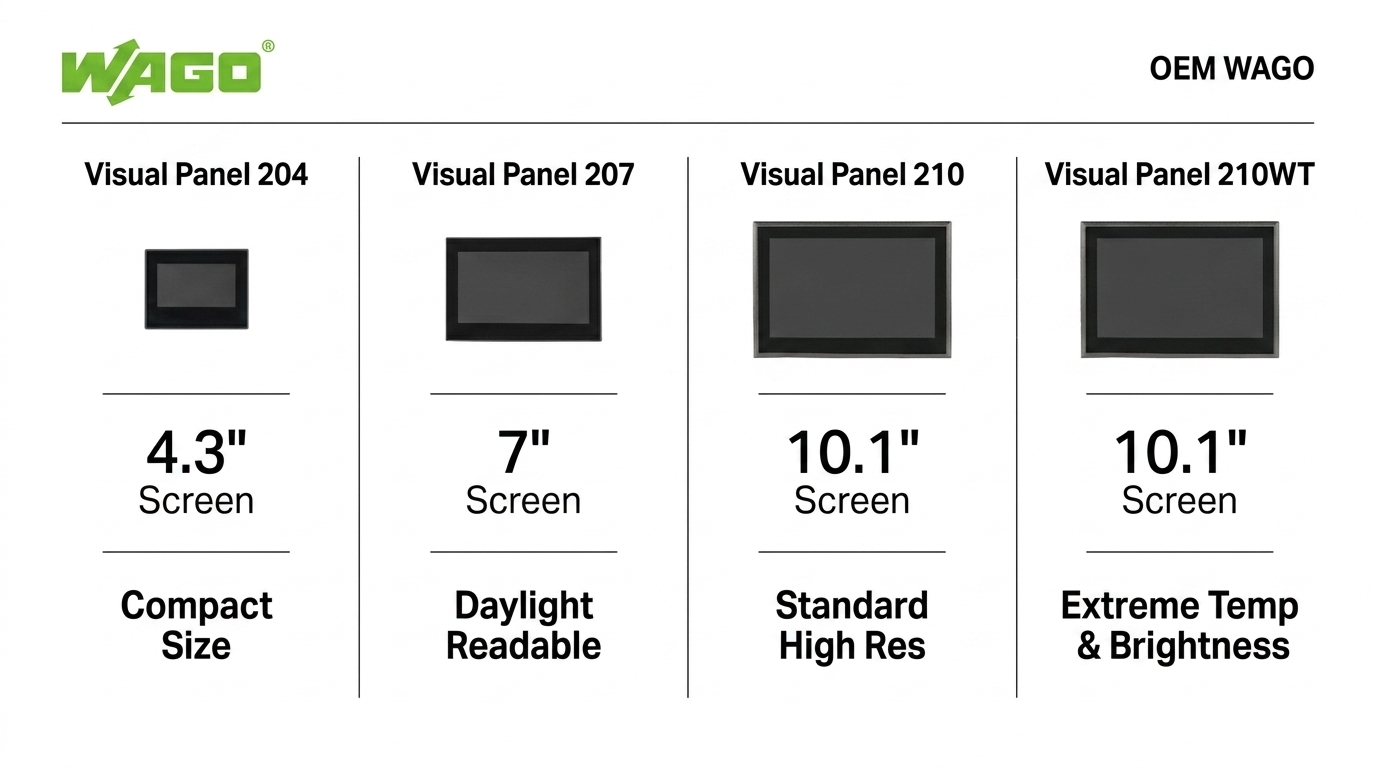
The WAGO Visual Panel 204 (8003-099/000-160) is the compact entry point: a 4.3-inch 800 x 480 display at 600 cd/m², single Gbit Ethernet, IP65 front rating, and a 0 to +65°C range. It is the right pick for compact machines and tight enclosures where a small, sealed operator screen is all the application needs.
The WAGO Visual Panel 207 (8003-099/000-188) is the mid-size workhorse: a 7-inch 1024 x 600 display at a bright 1000 cd/m², dual Gbit Ethernet, IP68 front rating, and a -20 to +70°C range on a quad-core i.MX8M Plus processor. It fits the majority of general machine-HMI applications, including washdown areas.
The WAGO Visual Panel 210 (8003-099/000-162) is the large-format standard model: a 10.1-inch 1280 x 800 (16:10) display, dual Gbit Ethernet, IP68 front rating, VESA mounting, and an aluminum housing. It is built for information-dense dashboards in standard indoor lighting.
The WAGO Visual Panel 210WT (8003-099/000-163) is the daylight-readable, wide-temperature variant of the 10.1-inch panel: the same 1280 x 800 display pushed to 1200 cd/m² and a -30 to +70°C operating range. It is the model to specify for outdoor, direct-sunlight, or extreme-temperature installations.
Frequently asked questions
What software do WAGO Visual Panel 200 HMIs use?
All Visual Panel 200 models are programmed with WAGO Visual Designer, a no-cost engineering tool with alarms, trending, data logging, recipe management, a project simulator, a VNC server and viewer, and a web server. There are no development or runtime licenses to purchase.
Which WAGO Visual Panel 200 model is daylight-readable?
The Visual Panel 210WT (8003-099/000-163) has a 1200 cd/m² daylight-readable 10.1-inch display and a wide -30 to +70°C operating range, making it the choice for outdoor and high-ambient-light installations.
What is the difference between the Visual Panel 210 and 210WT?
Both are 10.1-inch 1280 x 800 panels. The Visual Panel 210 has a 500 cd/m² display rated -20 to +70°C for standard indoor use. The Visual Panel 210WT uses a 1200 cd/m² daylight-readable display and a wider -30 to +70°C range for sunlight and extreme-temperature environments.
Are WAGO Visual Panel 200 HMIs rated for washdown?
The 7-inch and 10.1-inch models (VP207, VP210, VP210WT) carry an IP68 front rating with NEMA 4X / 12. The 4.3-inch VP204 carries an IP65 front rating with NEMA 4X / 12. All are IP20 on the rear.
What protocols do the Visual Panel 200 HMIs support?
The series supports OPC UA Server/Client, Modbus TCP (master/slave) and Modbus RTU, EtherNet/IP (ODVA) adapter and scanner, MQTT JSON Publisher (SparkPlug), and CODESYS, plus a broad library of third-party PLC drivers. With Modbus client/server support, a panel can also serve as an inter-protocol gateway.
Automation Distribution is an authorized WAGO distributor. Browse the full WAGO Visual Panel 200 HMI lineup at Automation Distribution, or call 1-888-600-3080 to discuss which model fits your visualization application.