
Posted by Automation Distribution Staff on Mar 18th 2026
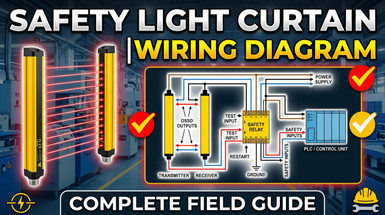
Safety Light Curtain Wiring Diagram: A Complete Field Guide
Safety Light Curtain Wiring Diagram: A Complete Field Guide
For technicians, engineers, and maintenance staff. Everything you need to wire a safety light curtain correctly — NPN/PNP, OSSD dual-channel, EDM, reset modes, and commissioning.
If you've landed here, you probably have a light curtain in your hand, a machine waiting to be commissioned, and a wiring question nobody has answered clearly yet. This guide is written for you — the technician, engineer, or maintenance professional working hands-on with safety light curtains. No fluff. Straight to what you need to wire it right the first time.
How a Safety Light Curtain Actually Works
A safety light curtain consists of two opposed columns: a transmitter (Tx) and a receiver (Rx). The transmitter fires a series of synchronized infrared beams across the protected area. The receiver detects those beams. When any beam is broken — by a hand, arm, or opaque object — the receiver signals the machine control to stop.
The receiver communicates this stop command through its Output Signal Switching Devices (OSSDs) — two independent, cross-monitored transistor outputs. Both must be in the ON state (beams clear) for the machine to run. If either switches OFF, the machine stops. This dual-channel architecture shapes how you wire the entire system.
| Component | Function | Wiring Requirement |
|---|---|---|
| Transmitter (Tx) | Emits modulated IR beams | Power only — 24V DC +/− |
| Receiver (Rx) | Detects beams, processes signals | Power + OSSD output wiring |
| OSSD1 & OSSD2 | Dual safety outputs to machine control | Both must be independently connected & monitored |
| Safety Relay / PLC | Receives OSSDs, controls machine contactor | Must match OSSD output type (NPN or PNP) |
| EDM Input | Monitors contactor/relay feedback | Required for most safety relay applications |
| Reset Input | Allows restart after beam clear | Wired per required reset mode (auto or manual) |
The First Decision: NPN or PNP?
This is the single most common source of wiring errors in the field. Before running a single wire, determine whether your light curtain outputs NPN or PNP — and whether that matches your safety relay or PLC input type.
- →Switches load to 0V (negative rail)
- →Common in older PLCs
- →Load connects between output and +24V
- →Switches load to +24V (positive rail)
- →Standard on modern safety PLCs & relays
- →Preferred for new installations
| Feature | NPN (Sinking) | PNP (Sourcing) |
|---|---|---|
| Output switches to | 0V (negative rail) | +24V DC (positive rail) |
| Common in | Older PLCs, some Asian equipment | Modern safety PLCs & relays |
| Risk if mismatched | No signal / possible damage | No signal / possible damage |
| New install recommendation | Only if required by existing control | ✓ Preferred — use PNP |
Wire Color Code Reference
The IEC color coding standard is the common baseline across most European and global safety sensor brands including Leuze. Always verify against your specific device's datasheet — pin assignments vary by model.
Wiring the Transmitter
The transmitter is the simpler half. On most modern safety light curtains using optical synchronization, the transmitter requires power only — no signal output wiring.
- 1Connect Brown wire to +24V DC supply terminal.
- 2Connect Blue wire to 0V / DC common.
- 3Connect Yellow/Green (shield) to panel earth ground — single point only. Grounding at both ends creates a ground loop.
- 4If your model has a test wire: connect it to +24V DC. An unconnected test input causes the curtain to fail its self-test and remain tripped.
Wiring the Receiver
The receiver carries all the signal wiring. This is where errors happen. Follow each step carefully.
Step 1 — Power
- 1Brown → +24V DC
- 2Blue → 0V DC
Step 2 — OSSD Outputs (The Critical Connection)
Both OSSD1 and OSSD2 must be connected to your safety relay or safety PLC. Do not use standard relays or merge both OSSDs into a single input.
- 1Black (OSSD1) → Safety relay/PLC input channel 1
- 2White (OSSD2) → Safety relay/PLC input channel 2
Step 3 — EDM (External Device Monitoring)
EDM monitors the contactor that the safety system controls, verifying it actually opened when commanded. Without EDM, a welded contact could allow machine restart even when the safety system commands a stop.
- 1Connect the NC feedback contact of your safety contactor(s) to the EDM input.
- 2If EDM is not used, the EDM pin must be connected to +24V DC — confirm in your model's manual. Leaving it open causes a permanent trip.
Step 4 — Reset Input
- →Automatic Reset: Outputs turn back ON as soon as beams are clear. For point-of-operation guarding where the operator is always visible.
- →Manual Reset: A deliberate reset action is required after a trip. Required for access guarding to prevent restart while someone is inside a machine cell.
For manual reset: connect a momentary pushbutton (or PLC output pulse, minimum 100ms) between +24V DC and the reset input pin.
Wiring to a Safety Relay
When the light curtain is not connected to a safety PLC, a dedicated safety relay interfaces the OSSD outputs to the machine's stop circuit. This is the most common configuration for simple machine guarding.
- 1OSSD1 → Safety relay Input Channel 1 (S11/S12 or equivalent)
- 2OSSD2 → Safety relay Input Channel 2 (S21/S22 or equivalent)
- 3Safety relay safety outputs → Coil circuit of machine contactors K1, K2
- 4NC auxiliary contacts of K1 & K2 → EDM feedback input on safety relay
- 5Reset pushbutton → Safety relay reset terminal (S33/S34 or equivalent)
- 6Safety relay powered at +24V DC, 0V common
NC vs. NO Output Logic
For machine safety, you must always use Normally Closed (NC) output logic. If a wire breaks in an NC circuit, the output goes to the safe state — machine stops. A NO output failure looks identical to "field clear," so the machine keeps running when it shouldn't.
| Output Mode | Field Clear | Field Broken | Safety Use |
|---|---|---|---|
| Normally Closed (NC) | Output ON | Output OFF → Machine stops | ✓ Required |
| Normally Open (NO) | Output OFF | Output ON | ✗ Not for safety stop |
Common Wiring Mistakes & Fixes
| Problem | Likely Cause | Fix |
|---|---|---|
| Stays tripped at power-on | EDM input not wired | Wire EDM, or connect to +24V if not used |
| Won't reset after beam clears | Manual reset mode, no reset signal | Wire reset pushbutton or switch to auto reset |
| No signal at PLC / relay | NPN/PNP output mismatch | Verify output type matches relay/PLC input type |
| Intermittent nuisance trips | Long runs, no shielding, ground loop | Use shielded cable, ground shield at one end only |
| No latch after reset | Auto reset on access guarding application | Change to manual/latch reset mode via DIP switch |
| Only one OSSD channel wired | Dual-channel requirement missed | Wire both OSSD1 and OSSD2 to separate input channels |
Commissioning Checklist
Run through all 13 steps before applying power to a newly wired installation:
- 1Verify power supply is 24V DC with adequate current capacity.
- 2Confirm NPN/PNP output type matches safety relay or PLC input type.
- 3Verify OSSD1 and OSSD2 are independently wired to separate input channels.
- 4Check EDM wiring — NC feedback contacts from contactors connected to EDM input.
- 5Confirm reset mode matches the application (auto for point-of-operation; manual for access guarding).
- 6Verify shield wire grounded at one point only.
- 7Confirm Tx and Rx are properly aligned — check LED indicators on device.
- 8Verify no objects are in the protective field before first power-up.
- 9Confirm minimum safety distance maintained per ISO 13855 calculation.
- 10Test beam interruption: block the field manually and confirm machine stops.
- 11Test reset: clear field, perform reset, confirm machine can restart.
- 12Test fault detection: disconnect one OSSD wire and confirm system does not allow restart.
- 13Document wiring configuration and retain with the machine technical file.
Working With a Trusted Automation Distributor
Even with the best wiring guide, getting it right takes more than technical knowledge alone.
A machine that's safe, compliant, and running — without a commissioning nightmare. The right device, wired correctly, validated to your required performance level, and documented for your safety audit.
Picking the wrong safety rating for your risk assessment, NPN/PNP incompatibility with your existing PLC, getting stuck during commissioning without expert support, or failing a compliance audit because the documentation isn't right.
Automation Distribution stocks Leuze safety light curtains and provides real pre-sales application support — not just a part number. We help you match the right device to your safety category, confirm output type compatibility with your control architecture, and stand behind the products we sell.
Disclaimer: This guide is intended for educational purposes only. Safety light curtains are safety-critical devices. Final system design, wiring, and validation must be performed by qualified personnel in accordance with applicable local regulations, machine directives, and manufacturer specifications. Always consult the specific product manual for your device before installation.