
Posted by Automation Distribution Staff on Jul 16th 2026
PolyScope X: What Cobot Programming Software Should Do
Most cobot evaluations are won and lost on payload, reach, and repeatability. Those numbers are on every datasheet, they are easy to compare, and they are almost never the thing that determines whether the cell is still running three product changes from now. The thing that determines that is the software - and PolyScope X, Universal Robots' current-generation programming platform, is the clearest recent example of a robot vendor treating the software layer as the product rather than the wrapper around it.
What is PolyScope X?
PolyScope X is the operating system and programming environment for Universal Robots cobots, and the successor to PolyScope 5. It is not a reskin of the older platform. It is a ground-up rearchitecture that runs on the CB5.6 control box, uses a web technology stack so the interface can be reached from a browser on any device, and exposes an API that lets UR+ partners contribute functionality directly into the programming environment. The current release is version 10.12, and the 10.12 user manual and download is published openly by Universal Robots, selectable by robot model. You do not need an account or a sales contact to read the documentation for a platform you do not own yet - which is unusual enough in industrial automation to be worth pointing out.
PolyScope 5 is not going away on a short clock - it remains on a Long Term Support path, and PolyScope 5.26 LTS also runs on CB5.6 hardware. That means the hardware decision and the software decision can be made independently, which matters if you are standardizing a fleet. But every new UR platform - the UR15, the UR8 Long, the newest UR Series arms - treats PolyScope X as the native environment rather than the migration target.
Why the software layer is the part you cannot retrofit
A robot arm is a mechanical commitment. The programming environment is an organizational one. It determines who in the plant can touch the cell, how long a changeover takes, whether a program written for Cell 1 can be reused in Cell 4, and whether a stopped robot at 2 a.m. is a five-minute fix by the operator on shift or a call to the integrator.
That is why the PolyScope X design decisions below are worth reading even if there is not a UR cobot in your building and no plan to put one there. They are, collectively, a usable checklist for evaluating any robot programming environment - Universal Robots, FANUC, Doosan, Techman, or whatever lands on the quote pile next quarter. The right question is not "does it have a graphical interface." Every platform has a graphical interface. The right questions are the ones below.
The short version
Ask a vendor these six things before you ask about payload: Can I program it without standing at the machine? Can an operator run a changeover without a programmer? Can I reuse a routine instead of copy-pasting it? Can I move a program to another robot as one file? Can I tell at a glance where the program stopped? Can I tune motion without rewriting the program?
Six PolyScope X design decisions worth borrowing
1. Programming happens in a browser, not only on a pendant
PolyScope X is built on a web technology stack, so the interface can be opened from any device with a browser. Practically, that means program development does not have to happen standing in the cell with a pendant in one hand. It happens at a desk, in a lab, or off-site entirely, and it happens while the robot is still running the current job.
This is the single biggest change for anyone whose deployment schedule is constrained by machine access rather than programming skill. It also matters disproportionately for OEM and mobile builds, where there may be no pendant on the machine at all - the pendant-less OEM configurations of the UR12e exist specifically for this pattern.
2. The operator screen is not the programming screen
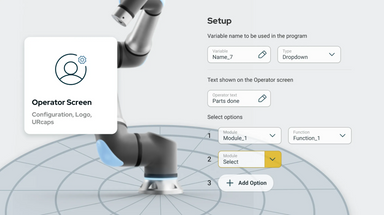
PolyScope X separates the operator interface from the programming interface. The person running the cell sees a purpose-built screen exposing only the variables, selections, and live values they need - part number, batch count, offsets, whatever the application demands - while the full program tree stays behind the programming view.
The consequence is that changeovers stop requiring an escalation. One flexible program with an operator-facing front end replaces a folder of separate programs per part family, and an operator who is not a robot programmer can run the changeover themselves. That is also what makes it realistic for one person to supervise several work cells instead of one.
3. Progressive disclosure instead of everything at once
PolyScope X reveals options as they become relevant rather than presenting the full parameter set up front. This is a well-established interface pattern and it is doing real work here: it centers the controls that matter for the task at hand, walks a user through multi-step configuration in order, and makes it harder to skip a step that will bite later - payload, center of gravity, and TCP being the classic examples.
The evaluation question this maps to: when a new technician configures a tool on your candidate platform, does the software make the correct sequence obvious, or does it assume they already know it?
4. Modules and functions - reuse instead of copy-paste
Program logic in PolyScope X can be structured into named modules and functions - a chuck open/close handshake, a door interlock sequence, an inspection routine - and called wherever they are needed. Functions can call other functions to arbitrary nesting depth, which keeps the visible program tree flat even when the underlying logic is not. Template programs built this way turn the second deployment of a pattern into a parameter change rather than a rewrite.
Related, and easy to overlook: PolyScope X has a real clipboard. Multiple nodes can be cut or copied and pasted as a group. Anyone who has rebuilt a fifteen-node sequence one node at a time will understand why this is on the list.
5. World-centric frames and offsets instead of hardcoded waypoints
PolyScope X teaches waypoints relative to world-centric frames, and supports relative transformations to frames and to other waypoints. Combined with the Grid feature - which handles patterned positions the way the PolyScope 5 palletizing wizard handled its base layout - this collapses the number of waypoints a program actually needs to carry.
The payoff shows up the day the fixture moves 40 mm. With hardcoded waypoints, that is a re-teach session. With frames and offsets, it is one number. Ask any vendor how many points have to be re-taught when a fixture shifts. The answer is a good proxy for how the whole environment is built.
6. Colored nodes, stop visibility, and OptiMove
PolyScope X color-codes program nodes by type, which conveys structure and hierarchy at a glance and makes execution flow legible during debugging. It also gives a clear visual indication of where a program terminated. Program stops are expensive in proportion to how long it takes to find them, and this is a small feature with a direct line to mean time to repair.
OptiMove is the motion side of the same idea. It exposes relative speed and acceleration as tunable settings, producing smoother motion, reduced vibration, better repeatability, and fewer nuisance protective stops - without restructuring the program to get there. Tuning motion should not require rewriting logic. On PolyScope X it does not.

You can evaluate PolyScope X in about 25 minutes without owning a cobot
This is the part worth acting on regardless of what is on your shortlist. Universal Robots publishes a free PolyScope X video tutorial track through UR Academy. It requires a free account, no hardware, and no sales conversation. The nine modules run about 25 minutes end to end:
| Module | Length | Why it is worth the time |
|---|---|---|
| Introduction to the PolyScope X GUI | 2m 35s | The layout and where things live. Start here. |
| Tool configuration with the wizard | 3m 28s | Payload, CoG, TCP, orientation, tool I/O. Progressive disclosure in practice. |
| A simple pick and place program | 3m 27s | The honest baseline for time-to-first-program. |
| Modules and functions | 2m 49s | Reusability and readability. The maintenance argument in three minutes. |
| Transform positions with offsets | 2m 18s | How to stop carrying waypoints you do not need. |
| Making a Grid in your application | 2m 27s | The PolyScope X answer to patterned positions and palletizing layouts. |
| A simple CNC application | 3m 21s | Grid, modules, functions, and transforms combined into one real cell. |
| Features of the operator screen | 3m 45s | The changeover-without-a-programmer video. Watch this one twice. |
| CNC lathe machine template walkthrough | 1m 26s | Teach the key waypoints, wire the I/O handshake, done. |
The track is at UR Academy video tutorials, under the PolyScope X tab. There is a parallel track for UR Studio, and separate tracks for URScript and safety configuration. If you are benchmarking cobot platforms against each other, twenty-five minutes of watching someone build a CNC cell is worth more than a week of comparing datasheets.
Which Universal Robots cobots run PolyScope X
PolyScope X requires the CB5.6 control box, which is the current controller across the UR lineup. Most models are orderable in both PolyScope 5 and PolyScope X configurations, and both platforms run the identical robot arm - the difference is the controller generation and the software. The newest arms treat PolyScope X as native rather than as an upgrade path.
- UR3e - 3 kg payload, 500 mm reach. Benchtop precision work, screwdriving, lab automation. Available on both platforms.
- UR5e - 5 kg payload, 850 mm reach. The broadest installed base in the e-Series. Available on both platforms.
- UR7e - 7.5 kg payload, 850 mm reach. The successor platform in the UR5e reach class.
- UR12e - 12.5 kg payload, 1300 mm reach. The volume mid-size platform and successor to the UR10e. Eight configurations across both software platforms; the PolyScope X SKUs are 200879, 200880, 200881, and 200882, running on CB5.6.
- UR16e - 16 kg payload, 900 mm reach. Highest payload density in the e-Series. PolyScope X variants add OptiMove.
- UR15 - 15 kg payload, 1300 mm reach, 5 m/s TCP speed. PolyScope X is the native environment on this platform, not a migration.
- UR18 - 18 kg payload, 950 mm reach. Heavy payload in a compact cell where long reach is not the constraint.
- UR8 Long - 8 kg payload, 1750 mm reach, 21 configurable safety functions. PolyScope X variants add Motion Profiles from software 10.10.0 onward.
- UR20 - 20 kg payload, 1750 mm reach. The palletizing platform. PolyScope X variants are the ones offering the 12 m robot cable option.
- UR30 - 30 kg payload, 1300 mm reach. Highest payload in the lineup.
The pendant-less OEM configurations are worth a separate mention, because they are where the browser-based architecture stops being a convenience and becomes the whole point. The DC-powered UR12e OEM variant ships without a pendant at all, for AMR and AGV integration, mobile platforms, and DC-bus machine builds. On that configuration, programming happens over the browser, URScript, RTDE, or the Dashboard Server, and nothing else. If you are maintaining an existing UR10e installation, that page carries the UR12e replacement SKU mapping.
The honest caveats
Three things worth saying plainly, because nobody's product page says them.
PolyScope X is not a free upgrade for an old fleet. It requires CB5.6 hardware. If your cobots are on earlier controllers, migrating means an upgrade kit per robot, not a software download. Budget it accordingly.
Mixed fleets have a real cost. If your team is fluent in PolyScope 5 and you add one PolyScope X cell, you now maintain two mental models. That is sometimes the right call and sometimes not, but it is never free. PolyScope 5.26 LTS also runs on CB5.6, which is exactly why you can standardize the hardware now and pick the software migration date separately.
Some capabilities are still maturing. Version 10.12 carries features that are explicitly beta. That is normal for a platform on an active release cadence, and it is a reason to check the current 10.12 documentation against your specific requirement rather than assuming a feature list from a launch announcement. The manual is public and selectable by robot model, so this is a ten-minute check, not a support ticket.
FAQ
What is PolyScope X in one sentence?
PolyScope X is Universal Robots' current-generation cobot operating system and programming platform - a ground-up rearchitecture of PolyScope 5 that runs on the CB5.6 control box, is accessible from a browser on any device, and uses node-based programming with reusable modules and functions.
Do I have to move from PolyScope 5 to PolyScope X?
Not immediately. PolyScope 5 remains on a Long Term Support path, and PolyScope 5.26 LTS runs on CB5.6 hardware - so the controller decision and the software decision are separable. New deployments generally default to PolyScope X because it is where platform development is happening, and because the newest arms such as the UR15 are native to it.
Can I program PolyScope X without a robot?
Offline programming is one of the platform's stated design goals - the browser-based stack means the environment is not tied to the pendant, and programs can be developed and validated away from the cell. A complete application, including all program data, exports as a single file and imports onto another robot. For OEM builds that ship without a pendant at all, such as the DC-powered UR12e OEM configuration, this is the primary programming path rather than a convenience.
What is OptiMove and does it actually matter?
OptiMove exposes relative speed and acceleration as tunable parameters, producing smoother motion, measurably reduced vibration, and better repeatability. The practical value is fewer unnecessary protective stops and shorter cycle times without restructuring program logic. It matters most on long-reach and high-payload platforms where path smoothness has the largest effect on both cycle time and joint wear - the UR20 and UR30 being the obvious cases.
What are Smart Skills?
Smart Skills are application modules accessible from anywhere in PolyScope X through a drawer, used to help position the robot accurately. They are contributable by any UR+ developer through the PolyScope X API - which is the structurally interesting part. Partner capability lands inside the programming environment rather than beside it. UR+ partners including OnRobot and Schmalz, both carried by Automation Distribution, are among the companies building on the platform.
Where can I see PolyScope X before committing to anything?
UR Academy's PolyScope X video tutorial track is free with an account and runs about 25 minutes across nine modules, covering the GUI, tool configuration, pick and place, modules and functions, offsets, grids, the operator screen, and a full CNC lathe template. No hardware required. Automation Distribution can also arrange a live demonstration.
Talk it through with someone who has deployed it
Automation Distribution is an authorized distributor of Universal Robots, and carries UR+ compatible tooling from OnRobot, Robotiq, Schmalz, and SMC. If you are weighing PolyScope 5 against PolyScope X for a new cell, planning a CB5.6 migration across an existing fleet, or trying to work out whether the operator screen removes enough changeover time to justify the project, that is a conversation worth having before the PO. Browse the full Universal Robots lineup at automationdistribution.com/robots, or call 1-888-600-3080 to discuss your application with our team.
Tending CNC machines specifically? Our deeper technical breakdown of PolyScope X for CNC machine tending covers the machine-side integration, teach-speed handling, and platform comparisons in detail.